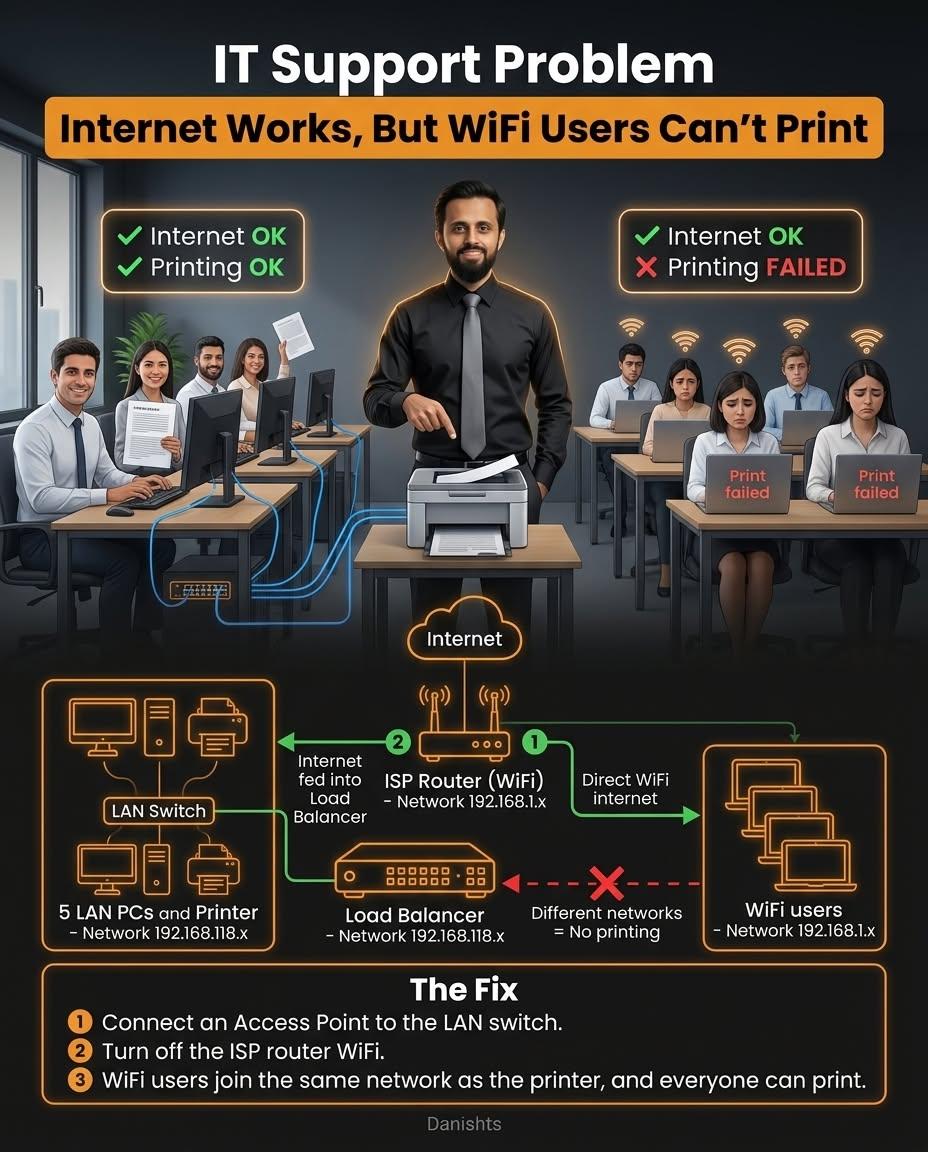
This is a problem I see in small offices: everyone has internet, the PCs connected by cable can print, but people on WiFi get "Print failed". The printer is not broken. The problem is the network.
What is happening
In this setup, the office has an ISP router with WiFi, and a load balancer feeding the LAN switch. That creates two separate networks:
- LAN PCs and the printer are on one network (for example 192.168.118.x).
- WiFi users are on the ISP router's network (for example 192.168.1.x).
Both can reach the internet, but devices on different networks cannot talk to each other directly. So the WiFi laptops cannot see the printer.
The fix
- Connect an access point to the LAN switch.
- Turn off the ISP router's WiFi.
- WiFi users now join the same network as the printer, and everyone can print.
Why this is the better design
With one network for all office devices, printing, shared folders and the file server work the same for wired and wireless users. You can also give guests a separate WiFi network, as explained in LAN vs WiFi in the Office.
If you have a similar problem, I can check it remotely or visit your office in Karachi. See my IT networking services.